


Whether you are a casual player unwinding after a long day or a competitive enthusiast chasing victory royale, accessories for gaming setup can transform an ordinary desk into a command center that feels immersive, comfortable, and high-performance. The truth is, a great gaming PC or console alone does not define the experience. It is the carefully chosen peripherals, ergonomic add-ons, and environment-enhancing gadgets that separate a mediocre session from one where you feel fully locked in. In this guide, we will walk through every category of gaming accessories, from the absolute essentials for newcomers to the premium gear that separates pros from amateurs.
Why Gaming Setup Accessories Matter More Than You Think
Many people overlook the importance of a well-rounded peripheral ecosystem when building their gaming desk setup. They invest thousands in a powerful rig but then skimp on the mouse pad, chair, or monitor arm they use every single day. The result? Discomfort, sluggish performance, and a setup that fails to inspire. Accessories for a gaming setup do not just look impressive on a stream — they directly influence your reaction time, posture, endurance, and overall enjoyment.
Think of your gaming station as a cockpit. Every control, surface, and support element needs to be optimized for precision and comfort. A gaming monitor with a high refresh rate gives you smoother visuals. A mechanical keyboard with customizable switches provides tactile feedback that improves your input speed. And an ergonomic gaming chair keeps your spine healthy during marathon sessions. Together, these components create a cohesive environment where your skills can flourish.
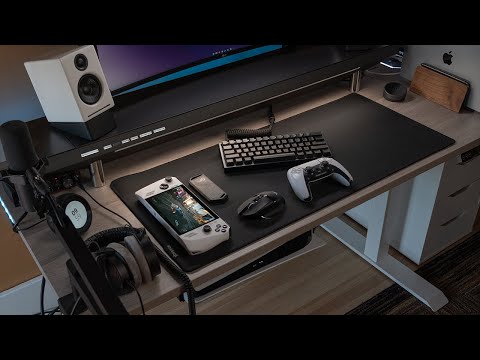
Essential Gaming Accessories for Beginners
If you are just getting started and building your first setup on a budget, you do not need to buy everything at once. Focus on the accessories that deliver the most immediate improvement to your experience.
1. Gaming Mouse and Mouse Pad
A decent gaming mouse is non-negotiable. Look for a model with adjustable DPI, programmable buttons, and a comfortable grip style — whether that is palm, claw, or fingertip. Pair it with a large extended mouse pad that gives you room for sweeping movements. Popular options from brands like Logitech, Razer, and SteelSeries offer excellent value without breaking the bank.
2. Gaming Headset
Sound design in modern games is incredibly detailed. A surround sound gaming headset lets you hear footsteps behind you, distant explosions, and subtle environmental cues that give you a competitive edge. Over-ear models with memory foam cushions are ideal for long sessions because they reduce ear fatigue. For voice chat, a headset with a noise-canceling boom microphone is a must-have.
3. Monitor and Display Stand
Even a mid-range gaming monitor with a 144Hz refresh rate and 1ms response time will make a dramatic difference. Add a monitor riser or adjustable arm to position the screen at eye level, which reduces neck strain and frees up desk space underneath for better cable management.
4. USB-C Hub and Cable Management
Beginners often underestimate how quickly cable chaos accumulates. A simple USB hub expands your connectivity options, while velcro ties and a cable management tray keep your workspace clean. A tidy setup is not just aesthetically pleasing — it also makes troubleshooting and upgrades much easier.
Intermediate-Level Accessories That Elevate Gameplay
Once you have the essentials covered, it is time to layer in accessories that refine every aspect of your experience. These are the upgrades that intermediate players notice immediately.
Mechanical Keyboard with Hot-Swap Switches
A hot-swappable mechanical keyboard allows you to change switches without soldering, giving you the freedom to experiment with linear, tactile, or clicky profiles. Brands like Keychron, Wooting, and QMK-compatible boards are popular choices among gaming keyboard enthusiasts who want deep customization.
RGB Lighting Strips and Smart Ambient Lighting
Lighting is not just decorative — it reduces eye strain during late-night sessions by providing ambient backlight behind your monitor. Smart LED strips from Nanoleaf, Govee, or Corsair iCUE sync with your games and music, creating an immersive atmosphere that pulls you deeper into every world you explore.
Streaming Microphone and Green Screen
If you plan to share your gameplay or start streaming, a USB condenser microphone from Blue, Elgato, or HyperX dramatically improves voice clarity. Combine it with a green screen and a ring light, and your broadcasts will look broadcast-quality on platforms like Twitch and YouTube.

Laptop Stand and Cooling Pad (For Portable Gamers)
Gamers who use laptops need dedicated support. An adjustable aluminum laptop stand elevates the screen to eye level, while a cooling pad with high-RPM fans prevents thermal throttling during demanding sessions. These are some of the most underrated gaming laptop accessories available.
Advanced Setup Accessories for Competitive and Enthusiast Gamers
For players who demand every possible edge, or for enthusiasts who want their rig to represent peak performance and style, the following accessories represent the highest tier of the market.
Ultrawide Curved Monitor or Dual-Monitor Arm Setup

An ultrawide gaming monitor with a 21:9 aspect ratio and quantum dot technology provides an expansive field of view that is unmatched for immersive single-player titles and sim racing. Alternatively, a dual monitor arm lets you position two screens side by side with perfect alignment, ideal for multitasking during esports broadcasts or multitasking workflows.
Custom PC Mousepad — Extended Extended
Competitive players swear by extra-large desk mats that cover the entire surface of their desk. These XL extended mouse pads from brands like SteelSeries QcK, Razer, and 3M provide consistent tracking across the full width of your arm movements, which is critical for FPS aim precision.
Pro-Grade Headset Stand and DAC/Amp
A premium headset stand keeps your headset protected and within arm’s reach, while a dedicated USB DAC and amplifier unlocks the full audio potential of high-impedance headphones. If you own a pair of Sennheiser HD 600s or Beyerdynamic DT 990s, a headphone amplifier is essential for driving them properly.
Programmable Elgato Stream Deck
The Elgato Stream Deck is a customizable button panel that lets you map complex macros, scene switches, and application shortcuts to a single press. It is widely used by streaming setup enthusiasts and esports professionals who need instant access to in-game actions and broadcast controls.
Comparison: Must-Have vs. Nice-to-Have Gaming Accessories
Not every accessory provides the same return on investment. Use the table below to prioritize your purchases based on your budget and goals.
| Accessory | Category | Impact Level | Budget Range |
| Gaming Mouse | Essential | High | $30–$150 |
| Gaming Headset | Essential | High | $40–$200 |
| Mechanical Keyboard | Essential | High | $60–$250 |
| Monitor Riser / Arm | Essential | Medium | $20–$80 |
| RGB Light Strips | Nice-to-Have | Medium | $15–$60 |
| USB DAC / Amp | Nice-to-Have | High (for audio enthusiasts) | $50–$300 |
| Stream Deck | Nice-to-Have | Medium | $100–$200 |
| Ultrawide Curved Monitor | Advanced | Very High | $400–$1,500 |
| Pro-Grade Mousepad (Extended) | Essential | Medium | $20–$50 |
The key takeaway here is to invest first in the essential gaming peripherals that affect your performance directly — mouse, headset, and keyboard — and then layer in the nice-to-have items as your budget allows.
Expert Tips for Maximizing Your Gaming Accessory Investment
- Match your accessories to your primary genre. FPS players benefit most from lightweight mice and high-refresh monitors, while RPG and strategy gamers gain more from mechanical keyboards with programmable macros.
- Prioritize ergonomics over aesthetics. A beautiful RGB-lit setup does not matter if you develop wrist pain or back issues after a week of use.
- Plan for cable management early. Use a desk cable tray and velcro straps from day one. Desks become chaotic fast without intentional routing.
- Buy from reputable brands with solid warranties. Gaming peripherals are used daily, so durability and after-sales support matter enormously.
- Test wireless vs. wired before committing. Modern wireless gaming mice and keyboards have eliminated most latency concerns, but some purists still prefer the reliability of wired connections for competitive play.
Frequently Asked Questions About Gaming Setup Accessories
What are the most important accessories for a basic gaming setup?
The three most important gaming PC accessories for any setup are a quality gaming mouse, a comfortable headset with microphone, and a mechanical keyboard. These three peripherals directly impact your input quality, communication, and overall comfort more than any other add-on.
How much should I budget for gaming setup accessories in total?
A reasonable budget gaming setup for accessories ranges from $150 to $400, covering a mouse, keyboard, headset, mousepad, and desk organizer. Enthusiast-level setups with ultrawide monitors, premium DACs, and RGB environments can easily exceed $1,000 in peripherals alone.
Do RGB accessories actually improve gaming performance?
RGB lighting itself does not improve performance. However, smart ambient lighting reduces eye strain during long sessions, which indirectly helps focus and endurance. The real performance gains come from high-refresh monitors, responsive mice, and mechanical keyboards — not the lights.
What is the best way to organize cables in a gaming setup?
The most effective methods include using a desk-mounted cable management tray, velcro cable ties, and a USB-C hub to consolidate connections. Route cables behind your desk where possible, and label each cable at both ends so future upgrades and troubleshooting are painless.
Can accessories for a gaming setup improve a laptop’s gaming performance?
While accessories cannot increase raw GPU power, they can significantly improve the experience. A cooling pad prevents thermal throttling, an external monitor provides better visuals, and a quality keyboard and mouse improve input accuracy and speed far beyond what a laptop trackpad and keyboard can offer.
What accessories are worth upgrading first if I already have a basic setup?
If you already own a basic setup, the highest-impact upgrades are a high-refresh gaming monitor, a better headset, and an extended desk mousepad. These three changes alone will make your sessions noticeably more comfortable, immersive, and competitive.
Final Thoughts on Building the Perfect Gaming Setup
Building the ultimate gaming setup is a journey, not a single purchase. Start with the essentials that match your play style and budget, then gradually add accessories that address your specific needs — whether that is better ergonomics, competitive performance gains, or aesthetic immersion. The best gaming accessories are the ones that feel invisible in your hands and let you focus entirely on the game itself. Invest thoughtfully, prioritize quality over quantity, and your setup will evolve alongside your skills and passion for gaming.