


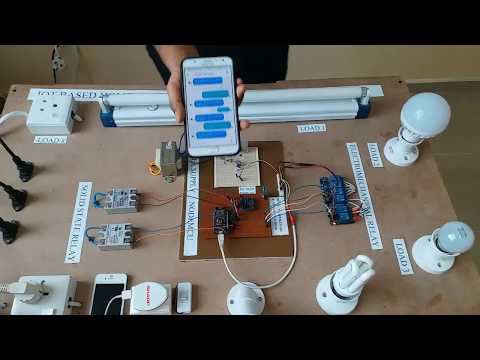
Home automation has evolved from a futuristic luxury into a practical, everyday technology that transforms how homeowners interact with their living spaces. Whether you are looking to enhance security, reduce energy consumption, or simply add convenience to your daily routine, a well-designed home automation system can deliver measurable results. In this comprehensive guide, we will explore everything you need to know — from foundational components and platform comparisons to expert tips and frequently asked questions that address real-world concerns for both newcomers and seasoned smart home enthusiasts.
What Is a Home Automation System?
A home automation system refers to an integrated network of devices, sensors, controllers, and software that work together to manage and automate household functions. These systems allow homeowners to control lighting, climate, security, entertainment, and appliance operations — often remotely through a smartphone app, voice command, or a centralized dashboard. At its core, the goal of a residential automation system is to create a seamless, efficient, and responsive living environment that adapts to your preferences and routines.
Modern home automation goes far beyond simple remote control. Advanced platforms leverage machine learning, geofencing, and real-time data analytics to anticipate your needs. For example, a smart thermostat can learn your daily schedule and adjust temperatures automatically, while occupancy sensors can turn lights off in unoccupied rooms without any manual input.
Core Components of a Home Automation Setup
Understanding the building blocks of a home automation ecosystem is essential before making any purchasing decisions. Each component plays a distinct role in ensuring your system operates reliably and at peak performance.
Smart Hubs and Controllers
The smart hub serves as the brain of your home automation system. It acts as a central bridge that communicates with all connected devices across different protocols. Popular hub options include Samsung SmartThings, Apple HomeKit, and Amazon Echo with Alexa built in. A standalone hub gives you the flexibility to unify devices from multiple manufacturers under one interface, eliminating the need to juggle separate apps for every product.
Sensors and Smart Devices
Sensors are the sensory layer of your automation setup. Common types include:
- Motion sensors — trigger lighting, alarms, or HVAC adjustments based on detected movement
- Door and window sensors — monitor entry points for security alerts and automation triggers
- Temperature and humidity sensors — provide granular climate data for precise HVAC control
- Light sensors — adjust lighting levels based on ambient natural light conditions
Alongside sensors, smart devices such as smart plugs, smart locks, smart cameras, and automated blinds form the action layer of your system, executing commands based on sensor data or user input.
Connectivity Protocols
The communication standard your devices use significantly impacts system reliability and range. Key protocols include:
- Wi-Fi — widely supported but can suffer from network congestion
- Zigbee — low-power mesh network ideal for large device ecosystems
- Z-Wave — similar to Zigbee with a focus on interoperability
- Matter — the newest unified standard designed to eliminate fragmentation across smart home brands
Benefits of Implementing Home Automation
Investing in a residential automation system delivers tangible benefits across multiple dimensions of home living:
- Energy Efficiency: Automated lighting and smart thermostats can reduce household energy bills by 15–30 percent, according to multiple energy studies. Scheduling systems to operate only when needed eliminates wasteful consumption.
- Enhanced Security: Smart locks, video doorbells, and automated lighting create a layered security approach that deters intruders and provides real-time alerts to your phone.
- Convenience and Accessibility: Voice-controlled routines — such as saying “good morning” to simultaneously open blinds, start coffee, and read the news — save time and simplify daily workflows.
- Property Value: Homes equipped with integrated automation systems tend to appeal more to buyers and can command a premium on the resale market.
- Remote Monitoring: Whether you are at work or traveling abroad, a mobile app gives you full visibility and control over every connected system in your home.
Comparing Popular Home Automation Platforms
Choosing the right platform is one of the most critical decisions when building a home automation system. Each ecosystem has its strengths, limitations, and device compatibility profile. The table below compares four leading options based on key criteria relevant to most homeowners.
| Platform | Device Compatibility | Voice Assistant | Setup Complexity | Best For |
| Amazon Alexa | Very High (70,000+ devices) | Built-in Alexa | Easy | Budget-conscious users wanting broad compatibility |
| Google Home | High (50,000+ devices) | Built-in Google Assistant | Easy | Users who rely heavily on Google services |
| Apple HomeKit | Moderate (select brands only) | Siri | Moderate | Apple ecosystem loyalists prioritizing privacy |
| Samsung SmartThings | Very High (open protocol support) | Bixby, Alexa, Google | Moderate | Advanced users with diverse device brands |

Expert Tip: If privacy is a top priority for you, Apple HomeKit is widely regarded as the most secure platform due to its end-to-end encryption architecture. However, if you want maximum device choice and lower costs, Amazon Alexa and Google Home remain the strongest contenders for most households.
Getting Started: A Step-by-Step Guide for Every Skill Level

Beginner Level: Start Small and Simple
If you are new to home automation systems, resist the temptation to overhaul your entire house at once. Start with one or two high-impact devices, such as a smart speaker and a smart plug. Set up a simple routine — for instance, having your smart speaker turn on a lamp at sunset. This low-risk introduction lets you learn the ecosystem without overwhelming complexity. Focus on products that support Matter or work within a single platform to avoid early compatibility headaches.
Intermediate Level: Expand to Core Systems

Once you are comfortable with basic devices, consider adding a dedicated smart hub and expanding into lighting automation, smart thermostats, and door sensors. At this stage, you should evaluate mesh networking protocols like Zigbee or Z-Wave, which provide stronger coverage than relying solely on Wi-Fi. Create automation scenes that group multiple actions — such as a “Movie Night” scene that dims lights, lowers blinds, and activates your sound system with a single command.
Advanced Level: Build a Fully Integrated Ecosystem
Advanced users can take advantage of programmable controllers, third-party integration platforms like Home Assistant or Node-RED, and custom scripting to create deeply personalized automation workflows. Geofencing capabilities allow your system to detect when you are approaching home and pre-adjust temperature, unlock doors, and turn on lights automatically. Professional-grade installations may also integrate energy monitoring dashboards and AI-driven predictive scheduling that learns and refines itself over time.
Expert Tips for Maximizing Your Smart Home Investment
Even the best automation system home setup will underperform without thoughtful planning. Follow these expert recommendations to get the most out of your investment:
- Prioritize a robust Wi-Fi network. A mesh Wi-Fi system with dedicated bandwidth ensures all smart devices maintain stable connections, especially in larger homes.
- Choose devices with local processing. Some smart devices process commands locally rather than in the cloud, which reduces latency and improves reliability during internet outages.
- Plan for scalability. Purchase hubs and devices that support future expansion. A closed ecosystem may be easier initially but can limit your options down the road.
- Secure your network. Use strong, unique passwords for every smart device and enable two-factor authentication on all associated accounts to prevent unauthorized access.
- Regularly update firmware. Manufacturers frequently release updates that patch security vulnerabilities and improve device performance. Enable automatic updates wherever possible.
- Document your automation rules. As your system grows, keeping a written or digital record of all routines and triggers helps you troubleshoot issues and avoid duplicate or conflicting automations.
Frequently Asked Questions
1. How much does it cost to install a home automation system?
The total cost varies significantly based on the scale and complexity of the setup. A basic starter kit with a smart speaker and a few smart plugs can begin around $100 to $200. A more comprehensive system with a dedicated hub, smart locks, thermostats, cameras, and sensors typically ranges from $500 to $2,000. Professional installations for fully integrated systems with custom programming can exceed $5,000, depending on the size of the property and the number of subsystems involved.
2. Can I install a home automation system myself, or do I need a professional?
Most modern residential automation systems are designed for DIY installation. Smart plugs, smart bulbs, and Wi-Fi cameras typically require no wiring and can be set up in minutes using a mobile app. However, more complex installations involving hardwired sensors, integrated security systems, or multi-zone HVAC automation may benefit from professional setup to ensure reliability and optimal performance.
3. What is the difference between a smart home and a home automation system?
While the terms are often used interchangeably, there is a meaningful distinction. A smart home is a broad concept referring to any residence equipped with internet-connected devices. A home automation system specifically implies that these devices are programmed to interact with each other and perform tasks automatically based on predefined rules, triggers, or learned behaviors. Automation is a subset of smart home technology that adds the intelligence layer.
4. Will a home automation system work during a power outage or internet failure?
This depends entirely on your system architecture. Wi-Fi-dependent devices will stop functioning without internet access. However, devices that use local processing or mesh protocols like Zigbee and Z-Wave can continue operating within your local network if the hub has battery backup. Smart locks with physical key overrides, battery-powered sensors, and locally stored automation routines provide critical resilience during outages.
5. Is home automation worth the investment for renters or people who move frequently?
Absolutely. Many home automation products are designed for portability. Smart plugs, plug-in smart hubs, wireless cameras, and smart lighting systems require no permanent installation and can easily be unplugged and transported. Renters can still enjoy energy savings, improved security, and enhanced convenience without making any structural changes to the property.
Conclusion
A thoughtfully implemented home automation system represents one of the most impactful upgrades a homeowner can make. From energy savings and enhanced security to everyday convenience and property value appreciation, the benefits are both immediate and long-lasting. Start with a clear understanding of your goals, choose a platform that aligns with your existing tech ecosystem, and build your system incrementally. With the right foundation, your home can become more intelligent, more efficient, and more responsive to the way you actually live.