


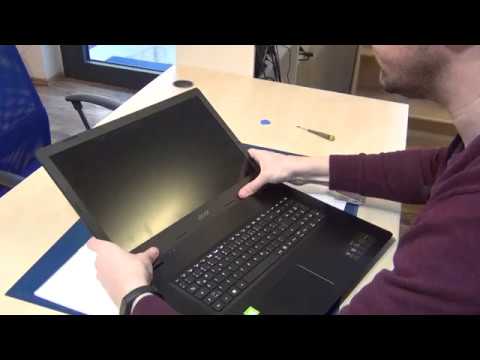
If you are staring at a cracked, flickering, or dead display on your 17.3 inch laptop, you are not alone. Replacing a large-format laptop screen can feel intimidating, but with the right guidance, it is a repair that most users can complete at home without professional help. This 17.3 laptop screen replacement guide walks you through every critical detail, from identifying the correct replacement panel to executing the physical swap with confidence. Whether you own a desktop replacement gaming rig, a mobile workstation, or a high-performance multimedia notebook, this article covers everything you need to know.
Why Your 17.3 Inch Laptop Display May Need Replacement
A 17.3 inch laptop screen endures significant wear because of its size, weight, and frequent use during travel or desk sessions. Understanding the root cause of screen failure helps you choose the correct replacement and avoid unnecessary costs.
Common Signs Your 17.3 Laptop Screen Is Failing
- Visible cracks or shattered glass across the display surface
- Horizontal or vertical lines running across the panel
- Flickering or intermittent display cutouts
- Dark spots, backlight bleeding, or uneven brightness
- Color distortion or washed-out imagery
- Screen remains black even when the laptop is powered on
Each of these symptoms points to a different type of damage. Cracks and shattering typically result from physical impact, while flickering or discoloration often indicates a failing inverter, backlight, or ribbon cable issue. Before purchasing a replacement panel, connect an external monitor to your laptop. If the external display works normally, the problem is almost certainly isolated to the 17.3 inch LCD panel itself rather than the motherboard or graphics card.
Tools and Materials You Will Need
Gathering your tools before starting prevents mid-repair frustration. Here is a complete checklist of everything required for a successful 17.3 laptop screen replacement.
- Replacement 17.3 inch display panel (matched by model number and connector type)
- Phillips-head screwdriver set, usually size #0 and #1
- Plastic spudger or prying tool
- Anti-static wrist strap
- Soft microfiber cloth
- Small tray or container for screws
- Isopropyl alcohol and lint-free swabs (for cleaning connectors)
Investing in a quality anti-static wrist strap is not optional for high-end laptops. Static discharge can damage sensitive motherboard components even if you do not touch them directly during the screen swap.
Compatibility Check: Finding the Right Replacement Panel
Not every 17.3 inch laptop display is interchangeable. You must verify several key specifications before ordering a new panel.
- Screen size: Always confirm the diagonal measurement is exactly 17.3 inches
- Resolution: Common options include Full HD (1920×1080), QHD (2560×1440), and 4K UHD (3840×2160)
- Panel type: TN, IPS, or VA technology each affects color accuracy and viewing angles
- Connector type: Most 17.3 inch panels use an eDP or LVDS connector
- Backlight type: LED edge-lit or direct-lit configurations differ significantly
- Bezel design and mounting bracket style: Varies between manufacturers
Your laptop’s service manual or the sticker on the original panel’s back cover will list the exact part number. Entering this part number into your search query is the fastest way to locate a compatible 17.3 inch replacement screen.
Step-by-Step 17.3 Screen Replacement Process

The following walkthrough provides a comprehensive, beginner-friendly approach to replacing your 17.3 inch laptop display. Work on a clean, well-lit surface and keep track of every screw.
Step 1: Power Down and Disconnect
Shut down your laptop completely, unplug the AC adapter, and remove the battery if it is removable. This eliminates the risk of electrical shorts during the disassembly process.
Step 2: Remove the Bezel
Use a plastic spudger to carefully pry the screen bezel away from the LCD frame. Most 17.3 inch laptop bezels are held in place by hidden clips rather than screws, though some models do use small Phillips screws along the top and side edges. Work slowly and evenly around the entire perimeter to avoid cracking the plastic.
Step 3: Detach the Old Display Panel

Once the bezel is removed, you will see the screws securing the LCD panel to the LCD frame. Remove these screws and gently lift the old panel out. Locate the video ribbon cable running along the bottom or side of the panel and carefully disconnect it by sliding the connector latch open. Do not force the cable.
Step 4: Install the New 17.3 Inch Panel
Align your replacement display panel with the mounting screws on the LCD frame. Secure the panel with the screws you removed earlier. Connect the eDP or LVDS ribbon cable firmly into the connector on the back of the new panel until the latch clicks into place.
Step 5: Reassemble the Bezel and Test
Snap the bezel back into position, ensuring all clips are seated properly. Reinstall the battery, connect the power adapter, and power on your laptop. Verify that the new 17.3 inch display powers up correctly, shows a sharp image, and has no dead pixels or backlight irregularities before fully reassembling the unit.
Common Mistakes to Avoid During 17.3 Screen Replacement
Even experienced repair technicians occasionally make avoidable errors. Being aware of these pitfalls saves time, money, and additional damage.
- Forcing the ribbon cable connector: This is the number one cause of connector damage during panel swaps
- Skipping the compatibility check: Ordering a panel based on size alone without verifying resolution and connector type
- Losing small screws: Use a magnetic tray and label screws by location
- Touching the panel surface: Finger oils can create permanent marks or affect touch-layer panels
- Reassembling too quickly without testing: Always power on and verify the display before closing the lid completely
- Ignoring hinge stress: 17.3 inch screens are heavy, and overtightening screws near the hinges can crack the chassis
Taking your time and following each step methodically dramatically reduces the chance of needing a second replacement attempt.
17.3 Laptop Display: Comparing Panels and Options
The replacement market for 17.3 inch laptop screens offers a wide range of choices that affect visual quality, power consumption, and price. Below is a comparison of the most common panel technologies available for large-format laptops.
| Panel Type | Color Accuracy | Viewing Angles | Response Time | Price Range |
| IPS | Excellent | Wide (178°) | Moderate (4-8ms) | Mid to High |
| VA | Very Good | Good (178°) | Slower (8-12ms) | Mid |
| TN | Fair | Narrow (170°) | Fast (1-3ms) | Low |
| OLED (Premium) | Outstanding | Excellent (180°) | Excellent (<1ms)< td> | High |
For most users replacing a 17.3 inch display, an IPS panel provides the best balance of color accuracy, viewing angles, and cost. If your laptop is primarily used for content creation or video editing, investing in an IPS or OLED replacement panel will deliver a noticeably superior viewing experience compared to a budget TN option.
Resolution also plays a major role in your replacement decision. A Full HD 1920×1080 panel is the most affordable and widely available option for 17.3 inch screens. However, QHD and 4K replacement panels are increasingly accessible and provide significantly sharper text and image detail, which is especially valuable on a 17.3 inch display where you have ample screen real estate to appreciate pixel density improvements.
Backlight type matters for brightness uniformity and power efficiency. Direct-lit LED backlights provide more even illumination across the entire panel surface, while edge-lit designs are thinner and consume less power but may exhibit slight brightness variations at the edges.
When to Seek Professional Help for 17.3 Screen Replacement
While this guide empowers you to handle the replacement yourself, certain situations warrant professional service. If your laptop chassis is severely damaged, if the hinge mechanism is broken, or if you encounter unexpected complications during disassembly, a certified repair technician can prevent further damage. Additionally, if your laptop is still under warranty, attempting a self-repair may void your coverage.
Expert Tips for a Flawless 17.3 Inch Screen Swap
- Photograph each disassembly step before removing any screws, so you have a visual reference during reassembly
- Clean the ribbon cable contacts with isopropyl alcohol before connecting the new panel
- Test the new screen outside the chassis before fully reassembling, if possible
- Apply a thin layer of anti-static tape along the cable routing path to prevent contact with metal chassis edges
- Calibrate the new display after installation using your operating system’s built-in display settings or a hardware calibration tool
These expert recommendations come from years of hands-on repair experience and will help ensure your 17.3 laptop screen replacement delivers professional-quality results.
Frequently Asked Questions
How long does a 17.3 laptop screen replacement typically take? Most users complete the entire 17.3 inch screen replacement process in 30 to 60 minutes, depending on their experience level and laptop model complexity. First-time repairers should allocate up to 90 minutes to work carefully and avoid rushing.
Can I replace a 17.3 laptop screen with a higher resolution panel? Yes, as long as the replacement panel matches your laptop’s connector type, physical dimensions, and mounting configuration. Upgrading from Full HD to QHD or 4K on a 17.3 inch display delivers a dramatic improvement in sharpness, but verify that your graphics hardware supports the higher resolution before purchasing.
Is a 17.3 inch laptop screen replacement expensive? Replacement costs for a 17.3 inch LCD panel typically range from $80 for a basic TN or budget IPS display to $250 or more for premium IPS, high-refresh-rate, or 4K panels. Professional repair services often charge an additional $100 to $200 for labor, making a DIY replacement a significant cost savings.
Do I need special software after replacing my 17.3 laptop display? No special software is required. The operating system automatically detects the new panel and applies appropriate display drivers. However, you may want to adjust resolution, refresh rate, and color calibration settings to optimize the new screen’s performance.
Will replacing the screen void my laptop warranty? If your laptop is still under the manufacturer’s warranty, opening the display assembly typically voids the warranty. Contact the manufacturer’s service department first to inquire about authorized repair options before attempting any self-repair on a covered device.
Replacing a 17.3 laptop screen is one of the most rewarding DIY repair projects available to everyday users. It requires no specialized electrical engineering knowledge, minimal investment in tools, and delivers immediate, tangible results. By following this 17.3 laptop screen replacement guide carefully, verifying compatibility at every step, and taking your time during disassembly, you can restore your large-format laptop display to like-new condition. The sense of accomplishment that comes from completing a hardware repair yourself is unmatched, and the money saved compared to professional service makes it a worthwhile endeavor for anyone willing to follow these instructions closely.