


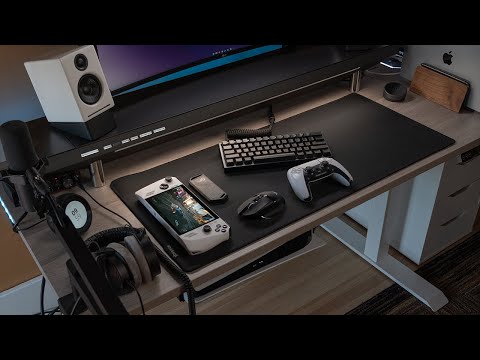
Building a high-performance gaming PC is only half the battle. The accessories you surround your setup with can completely transform your experience, turning a good rig into an absolutely immersive command center. Whether you are a casual player upgrading from a basic desk or a hardcore enthusiast chasing the ultimate competitive edge, choosing the right peripherals and add-ons matters more than most people realize. From precision input devices and immersive audio solutions to ergonomic furniture and ambient lighting, the best gaming PC accessories directly impact comfort, reaction time, and overall enjoyment. This guide breaks down every category you need to consider, compares top contenders, and provides actionable recommendations for every budget and skill level.
Why Gaming PC Accessories Deserve Serious Investment
Many builders focus their entire budget on internal components like the GPU, CPU, and RAM, then neglect the external peripherals that sit directly in front of them for hours every day. The truth is, your monitor, keyboard, mouse, and chair shape every interaction you have with your system. A sluggish monitor with poor color accuracy can ruin the visual fidelity that your graphics card works so hard to deliver. An uncomfortable desk chair can turn a two-hour session into a back-paining ordeal. Investing in quality gaming PC accessories ensures that your hardware capabilities translate into real-world performance and comfort.
The right peripherals also reduce fatigue, improve posture, and sharpen your reflexes during competitive play. Studies on ergonomics show that properly positioned monitors and supportive seating reduce strain and keep you sharper for longer sessions. When you pair that with responsive input devices and clear audio, you gain a tangible edge in fast-paced titles where milliseconds matter.
Must-Have Gaming PC Accessories for Every Setup
Gaming Monitors: Your Visual Foundation
The monitor is arguably the most important accessory you can buy for your gaming PC. It is the window into every game you play, and settling for a low-refresh or low-resolution panel wastes the potential of even the most expensive graphics card. Modern gaming displays come in a range of specifications tailored to different needs and budgets.
- Refresh Rate: 144Hz is the current sweet spot for most gamers, while 240Hz and 360Hz panels cater to competitive FPS players.
- Resolution: 1080p remains budget-friendly, 1440p offers the best balance of clarity and performance, and 4K delivers uncompromised detail for those with powerful hardware.
- Response Time: Look for 1ms GtG (gray-to-gray) response times to minimize ghosting and motion blur during fast-paced action.
- Panel Technology: IPS panels provide the best color accuracy and viewing angles, while TN panels offer the fastest response times at the cost of color reproduction.
When shopping for monitors, pay close attention to adaptive sync technologies like NVIDIA G-Sync and AMD FreeSync, which eliminate screen tearing and stuttering without requiring you to max out your frame rate.
Keyboards and Mice: Precision Input Devices

Your keyboard and mouse are the primary tools through which you interact with every game. Choosing the right models for your playstyle is not a trivial decision.
Mechanical Keyboards dominate the gaming accessory market for good reason. Switch options like Cherry MX Red (linear and fast), Cherry MX Brown (tactile and quiet), and Cherry MX Blue (clicky and satisfying) let you customize your typing and gaming feel. Wireless mechanical keyboards have matured significantly, with brands like Razer, Logitech, and Corsair offering low-latency 2.4GHz wireless connections that rival wired performance.
Gaming Mice should match your grip style and game genre. Lightweight mice under 80 grams are trending among competitive FPS players who prioritize speed and precision. Look for sensors capable of at least 20,000 DPI, onboard memory for storing profiles, and durable Omron switches rated for tens of millions of clicks.
Headsets and Audio: Immersion and Communication
Sound design in modern games is incredibly detailed, and a quality headset lets you hear subtle cues like footstep direction, environmental reverb, and distant gunfire that can mean the difference between winning and losing. A surround-sound gaming headset with a high-quality microphone is essential for multiplayer coordination.
For an even more immersive experience, consider a dedicated audio setup. A pair of open-back headphones paired with a standalone sound card or DAC delivers audio staging and clarity that headsets simply cannot match. Spatial audio technologies like Dolby Atmos and Windows Sonic Headphone Virtualization add another dimension to your listening experience without requiring extra hardware.
Ergonomic Chairs and Desks: Comfort That Lasts
Long gaming sessions demand proper support. An ergonomic gaming chair with adjustable lumbar support, seat depth, armrest height, and recline tension protects your spine and neck during marathon sessions. Budget-friendly options from brands like Autonomous and Furmax still deliver solid ergonomics, while premium chairs from Secretlab and Herman Miller offer premium materials and build quality that lasts years.
Your desk matters equally. An adjustable sit-stand desk lets you alternate between sitting and standing, reducing the physical toll of prolonged gaming. Cable management trays and accessories keep your setup clean and help airflow around your components.
Advanced Accessories for the Enthusiast Setup
Once you have locked in your core peripherals, there is a world of additional accessories that elevate your setup from functional to extraordinary.
- Capture Cards: Products like the Elgato HD60 X and AverMedia Live Gamer Ultra let streamers record and broadcast their gameplay with minimal latency and high-quality output.
- Streaming Lighting: Ring lights and LED panels from brands like Elgato and Govee create professional-looking stream aesthetics and improve your webcam image quality.
- Cable Management Solutions: Custom cable sleeves, velcro ties, and magnetic cable clips transform a tangled mess into a clean, visually stunning desk setup.
- USB Hubs and Docking Stations: With modern peripherals demanding multiple USB ports, a quality USB 3.2 hub prevents the frustration of running out of connections.
- Custom Controller Stands and Charging Stations: These keep wireless controllers organized and always powered up without cluttering your desk space.
How to Choose the Right Accessories for Your Gaming PC
Selecting the best accessories requires balancing your budget, preferred genres, and the specific features that matter most to you. The table below compares popular categories across key decision factors.
| Category | Budget Range | Key Feature to Prioritize | Best For |
| Gaming Monitor | $150–$800 | Refresh rate and panel type | Visual quality and smooth gameplay |
| Mechanical Keyboard | $60–$250 | Switch type and build quality | Responsive input and typing feel |
| Gaming Mouse | $30–$150 | Sensor accuracy and weight | Competitive precision and speed |
| Headset | $40–$200 | Microphone clarity and surround sound | Communication and immersion |
| Ergonomic Chair | $150–$1,200 | Lumbar support and adjustability | Long-session comfort and health |
| Streaming Equipment | $100–$400 | Latency and video resolution | Content creation and broadcasting |
The most important takeaway is that no single accessory exists in a vacuum. Your monitor refresh rate should complement your GPU’s frame output, your chair should fit your body type, and your mouse should suit the games you play most frequently. Treat your accessory choices as part of an interconnected ecosystem rather than isolated purchases.
Expert Tips to Maximize Your Gaming PC Setup
Prioritize your monitor upgrade. If your budget allows only one accessory purchase, invest in a high-refresh-rate monitor first. The difference between 60Hz and 144Hz is immediately noticeable and profoundly impacts gameplay fluidity.
Do not ignore cable management. Clean setups improve airflow inside your case and reduce dust accumulation. A tidy desk also reduces stress and makes troubleshooting easier when something goes wrong.

Calibrate your peripherals. Take ten minutes to adjust DPI sensitivity on your mouse, keybind configurations on your keyboard, and audio profiles in your headset. Proper calibration unlocks the full potential of even mid-range hardware.
Consider warranty and support. Premium gaming accessories often come with extended warranties and dedicated support teams. This matters when you invest $200 or more in a single product and want peace of mind.
Frequently Asked Questions
What are the most essential gaming PC accessories for beginners?
Start with a 144Hz monitor, a reliable mechanical keyboard, a lightweight gaming mouse, and a comfortable headset. These four items form the foundation of any gaming setup and provide immediate, noticeable improvements over basic stock peripherals. You can always upgrade incrementally as your budget allows.
How much should I spend on gaming PC accessories?
A reasonable accessory budget ranges from 20 to 30 percent of your total PC build cost. For a $1,500 gaming rig, that translates to $300–$450 allocated across monitor, keyboard, mouse, headset, and chair. This ratio ensures you do not overspend on peripherals at the expense of core components while still getting a noticeably superior experience.
Are wireless gaming accessories worth the price?
Absolutely. Modern wireless gaming peripherals from top brands deliver latency as low as 1ms through dedicated 2.4GHz receivers, making them virtually indistinguishable from wired alternatives. The freedom of cable-free setups also reduces desk clutter and improves mobility during intense gaming sessions.
What is the best way to choose a gaming monitor size?
For desk setups between 24 and 27 inches, a 1440p monitor at 27 inches provides the ideal pixel density and screen real estate balance. If you sit farther away or want a more cinematic experience, a 32-inch 1440p or a 27-inch 4K panel works well. Match the size to your desk depth and viewing distance rather than chasing the biggest screen possible.
Do I need a separate sound card for gaming audio?
Not necessarily for most gamers. Modern motherboards include capable onboard audio that handles gaming and general multimedia well. However, competitive players and audiophiles benefit from dedicated external DACs or sound cards that provide cleaner audio signals, better surround sound processing, and reduced electromagnetic interference.
Final Thoughts
Gaming PC accessories are the bridge between raw hardware power and the actual experience you feel every time you sit down to play. From the crystal-clear visuals on a high-refresh monitor to the satisfying click of a perfectly tuned mechanical switch, every choice shapes your relationship with your games. Take the time to research, compare, and invest thoughtfully in each category that matters to you. A well-curated setup not only performs better but lasts longer, keeps you comfortable, and makes every session something to look forward to. Start with the essentials, refine as you learn your preferences, and build a gaming environment that truly feels like yours.