


If you have ever wondered how to transform a scattered collection of smart devices into a truly unified, intelligent home, a home automation hub is the missing piece of the puzzle. Whether you are a tech enthusiast exploring your first connected light bulb or a seasoned smart home architect managing dozens of sensors, switches, and cameras, understanding what a smart home hub does and how to choose the right one can make all the difference. This guide dives deep into everything you need to know about home automation hubs, from core functionality and connectivity protocols to hands-on setup tips, expert recommendations, and the emerging trends that will shape centralized home control in the years ahead.
What Is a Home Automation Hub and Why It Matters
A home automation hub, also commonly referred to as a smart home controller or IoT gateway, is a physical device or software platform that acts as the central brain of your connected home ecosystem. Rather than managing each smart device through its own separate app, a smart home hub communicates with multiple devices across different wireless protocols, translating their signals into a single, cohesive system you can control from one dashboard. Think of it as a universal translator for your smart home. Without a centralized home automation system, you would need to open five or six different applications just to turn off the lights, adjust the thermostat, and lock your front door. A smart home coordinator eliminates that friction, creating automated routines and scenes that respond intelligently to triggers, schedules, and sensor inputs. This centralized approach is the foundation of what experts call a true smart home setup, where devices work together rather than in isolation.
How Home Automation Hubs Work

At its core, a smart home hub bridges the gap between devices that use different communication standards. Your smart lock might use Z-Wave, your light bulbs might rely on Zigbee, your security camera might connect over Wi-Fi, and your garage door opener might use a proprietary protocol. The home automation controller manages all of these simultaneously, maintaining persistent local connections so that your automated routines continue working even if your internet goes down. This local processing capability is one of the most significant advantages of a dedicated home automation platform over cloud-dependent alternatives.
Protocols and Connectivity Standards
Understanding the wireless protocols supported by your automation controller is critical when building a reliable smart home network. Here are the most common standards you will encounter:
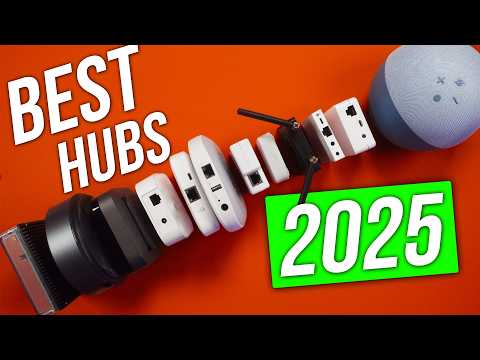
- Zigbee — A low-power mesh networking protocol ideal for sensors, bulbs, and switches. It creates a self-healing network where each device can relay signals, extending range and reliability.
- Z-Wave — Similar to Zigbee but operates on a different frequency band, which reduces interference with Wi-Fi. It supports a large ecosystem of certified smart home products.
- Matter — The newest and most promising unified smart home standard, backed by Apple, Google, Amazon, and the Connectivity Standards Alliance. Matter aims to make cross-platform device compatibility effortless.
- Wi-Fi — While convenient, Wi-Fi-enabled devices tend to consume more power and can strain your home network when used at scale.
- Bluetooth and Thread — Bluetooth is useful for proximity-based controls, while Thread is a low-power mesh protocol gaining rapid adoption in the Matter ecosystem.
Top Home Automation Hubs Compared
Not all smart home controllers are created equal. The table below compares some of the most popular home automation hubs on the market, highlighting their key strengths, supported protocols, and ideal use cases.
| Hub | Protocols Supported | Best For | Price Range |
| Hubitat Elevation | Zigbee, Z-Wave, Matter | Local-first automation enthusiasts | $100–$150 |
| Amazon Echo Plus (4th Gen) | Zigbee, Wi-Fi | Budget entry-level smart home | $80–$110 |
| Samsung SmartThings Station | Zigbee, Z-Wave, Matter, Wi-Fi | Broad ecosystem compatibility | $70–$100 |
| Home Assistant (Software) | Nearly everything | Advanced DIY and power users | Free (runs on Raspberry Pi or PC) |
| Apple HomePod Mini | Thread, Wi-Fi, Matter | Apple ecosystem households | $100 |
As you can see from this smart home hub comparison, your choice depends heavily on what protocols your devices use, whether you prioritize local processing over cloud integration, and which digital assistant ecosystem aligns with your lifestyle.
Key Features to Look for in a Smart Home Hub
When evaluating smart home automation platforms, several features stand out as dealbreakers or major advantages. Here is what expert reviewers and seasoned smart home builders recommend prioritizing:
- Local processing capability — A centralized home automation system that processes automations locally is far more responsive and reliable than one that depends entirely on cloud servers. If your internet connection drops, your lights should still follow your scheduled routines.
- Broad protocol support — The more wireless standards a home automation controller supports, the more flexible your device choices become. Look for hubs that handle Zigbee, Z-Wave, and Matter at minimum.
- Open API and integration support — Hubs that expose open APIs or support third-party integration platforms like IFTTT, Alexa, Google Home, and Apple HomeKit give you far more customization power.
- Scalability — Your smart home will grow over time. Choose a centralized smart home system that can handle dozens or even hundreds of devices without performance degradation.
- User-friendly interface — Whether it is a mobile app or a web dashboard, your home automation controller should make creating routines, scenes, and triggers intuitive rather than requiring programming knowledge.
Compatibility and Ecosystem Support
One of the biggest frustrations for smart home beginners is discovering that a device they purchased does not work with their chosen automation platform. Before buying any hub, verify its compatibility list. The smart home ecosystem is gradually converging thanks to the Matter standard, but you will still find many products that only work within specific ecosystems. If you are invested in Apple’s HomeKit framework, a HomePod Mini or a Home Assistant setup with HomeKit Bridge integration will serve you best. If you prefer the flexibility of Amazon Alexa routines, platforms like Hubitat and SmartThings offer deep Alexa integration. Similarly, Google Home users should look for hubs that support Google Home device controls and voice commands natively.
Local vs Cloud Processing
This distinction is one of the most important technical considerations when building a centralized smart home system. Cloud-dependent hubs require a constant internet connection to execute automations, which means a service outage or Wi-Fi disruption can leave your home partially unresponsive. Local processing hubs handle automation logic on the device itself, delivering near-instant response times and greater privacy since your sensor data never leaves your home network. For security-focused users, local automation platforms also reduce the attack surface that cloud-connected systems present.
Setting Up Your Smart Home Hub: A Step-by-Step Guide
Getting started with a home automation hub is simpler than most people assume. Follow these practical steps to deploy your centralized smart home system effectively:
- Audit your existing devices — List every smart device you currently own, noting its brand, model, and wireless protocol. This inventory determines which hub will offer the broadest compatibility.
- Choose your hub and place it centrally — Position your automation controller in a central location in your home, ideally away from thick walls and large metal objects that can interfere with Zigbee or Z-Wave signals. A centralized placement maximizes mesh network coverage.
- Download the hub app and create your account — Most modern smart home controllers come with companion apps available for iOS and Android. Follow the on-screen pairing instructions to connect your hub to your home network.
- Add devices one by one — Put each smart device into pairing mode and add it through the hub app. Most hubs will automatically detect the device’s protocol and assign it to the appropriate category.
- Create your first automation — Start simple. Build a routine that turns on hallway lights at sunset and arms your security sensors when you leave home. As you gain confidence, you can layer in more complex triggers and conditions.
- Test and refine — Run your automations for a few days, noting any devices that respond slowly or rules that fire unexpectedly. Fine-tuning is an ongoing part of building a reliable home automation system.
Benefits of Using a Centralized Automation Hub
The advantages of a unified home automation setup extend well beyond convenience. A well-configured smart home hub reduces energy waste by coordinating heating, cooling, and lighting based on occupancy sensors and time-of-day schedules. It enhances home security by enabling automated lock engagement, camera activation, and alert notifications that respond to door sensor triggers and motion detection events. It also future-proofs your investment because a good automation controller supports new devices and standards as they emerge, meaning you do not have to replace your entire system every time a new smart product hits the market.
Enhanced Security and Privacy
Privacy-conscious homeowners often prefer dedicated home automation controllers that process data locally rather than sending sensor readings to third-party cloud servers. By keeping your automation logic and device communication within your own network, you minimize exposure to data breaches and maintain full control over who accesses your smart home information. Many advanced platforms also offer encrypted local storage for camera footage and integration with privacy-focused smart home accessories.
Common Mistakes to Avoid When Choosing a Hub
- Assuming all hubs support every protocol — Always double-check the specific wireless standards your devices use before purchasing.
- Overlooking local processing requirements — If internet reliability is a concern in your area, prioritize hubs that execute automations locally.
- Ignoring future scalability — A hub that works perfectly for ten devices may struggle or bottleneck when you add another thirty.
- Choosing based on price alone — The cheapest smart home hub may lack the protocol support, processing power, or community ecosystem you need as your system grows.
- Neglecting firmware updates — Choose a hub from a manufacturer that actively provides software updates to patch vulnerabilities and add new device support.
The Future of Home Automation Hubs
The home automation hub market is evolving rapidly, driven by the widespread adoption of the Matter standard and advances in edge computing. In the near future, we can expect hubs to integrate more artificial intelligence, enabling predictive automations that learn your daily patterns and adjust your home environment proactively rather than relying solely on manual triggers or rigid schedules. Voice control will become more natural and context-aware, and the line between a smart home hub and a general-purpose edge computing device will continue to blur. For anyone investing in a centralized smart home system today, choosing a platform that supports Matter and offers robust local processing ensures your setup remains relevant and powerful for years to come.
Frequently Asked Questions
What is the best home automation hub for beginners? For those just starting their smart home journey, the Samsung SmartThings Station and Amazon Echo Plus (4th Generation) offer the most accessible entry points. Both provide intuitive setup wizards, broad device compatibility, and voice control integration without requiring any technical expertise.
Do I really need a dedicated smart home hub if I already use smart speakers? Smart speakers like the Echo or Google Nest Mini can control individual devices, but they lack the deep protocol support and local automation engine of a dedicated home automation controller. If you plan to manage more than ten smart devices or build complex routines involving multiple protocols, a standalone hub significantly improves reliability and functionality.
Can a home automation hub work without the internet? Hubs that support local processing, such as Hubitat Elevation and Home Assistant, can execute most automations entirely offline. Your device controls and scheduled routines continue functioning during internet outages, which is a major advantage for security and reliability.
What is the difference between a smart home hub and a smart speaker? A smart speaker is primarily a voice-controlled interface with limited automation capabilities. A home automation hub is a dedicated controller designed to manage complex device networks across multiple wireless protocols, execute local automations, and serve as the central coordinator of your entire smart home ecosystem.
Is Home Assistant worth the learning curve? Home Assistant is widely regarded as the most powerful and flexible home automation platform available. While the initial setup requires more technical effort than plug-and-play hubs, its virtually unlimited device compatibility, local processing engine, and thriving community make it the top choice for advanced users who want complete control over their centralized smart home system.
What should I look for when comparing smart home hub options? Prioritize protocol support (especially Matter, Zigbee, and Z-Wave), local processing capability, ease of use, active firmware development, and the size of the manufacturer’s device compatibility database. These factors determine whether a hub will grow with your home automation needs or leave you replacing it within a year.
Conclusion
A home automation hub is far more than a fancy gadget — it is the cornerstone of a truly intelligent, responsive, and secure home. By choosing the right centralized smart home system, you unlock the ability to connect devices from different manufacturers, automate complex routines with precision, and enjoy the peace of mind that comes from a local-first, privacy-respecting architecture. Whether you are a beginner taking your first steps into connected living or an advanced user building a sophisticated multi-protocol network, investing in a quality smart home controller pays dividends in convenience, energy savings, and long-term scalability. The smart home revolution is already here, and the right hub is your gateway to making it work seamlessly for you.