


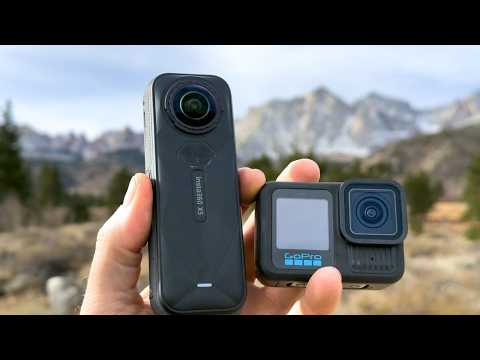
The world of action photography and videography has evolved dramatically over the past decade, and the 360 action camera sits right at the center of that transformation. Whether you are a travel vlogger capturing a winding mountain trail, a sports enthusiast diving into underwater scenes, or a content creator building immersive virtual reality experiences, a 360-degree camera offers a creative flexibility that traditional action cams simply cannot match. These devices record in every direction simultaneously, stitching together two or more fisheye lenses into a seamless spherical video that lets viewers explore the entire scene after the fact. If you have ever wanted to shoot a scene and decide the framing later, or place the camera in the middle of a chaotic moment and “steer” your way to the best angle in post-production, then this guide is built for you. We will walk through everything from the fundamentals of 360 video technology to advanced shooting workflows, product comparisons, and real-world tips that will help you get the most out of your omnidirectional camera investment.
What Is a 360 Action Camera and Why Does It Matter
A 360 action camera is a specialized device equipped with back-to-back fisheye lenses that capture a full spherical field of view. Unlike a standard action camera that records within a fixed rectangular frame, a 360 cam captures the entire surrounding environment at once. The raw footage is then processed through an internal stitching algorithm that merges the overlapping images into a single, coherent 360-degree video or photograph. This technology is what makes 360 video so compelling for immersive storytelling. The result is content that can be viewed on VR headsets, smartphones, computers, or even displayed as flat “reframed” footage where you choose the cinematic angle after the shoot. This concept, sometimes called spatial video, has gained tremendous traction across social media platforms, tourism boards, real estate agencies, and sports production teams. The key advantage is simple: nothing gets missed. Every moment, every angle, every background detail is preserved in the footage, giving editors and viewers total freedom of perspective.
Key Features to Look for in a 360 Action Camera
Sensor Quality and Resolution
Resolution is arguably the most critical specification when evaluating a 360 camera for vlogging or professional work. The best current models shoot in 5.7K or even 8K per lens, which translates to stunning stitched output suitable for 4K displays and VR headsets. Higher sensor quality also means better low-light performance, reduced noise, and richer color depth. If you plan to shoot in dim environments such as caves, nightclubs, or twilight landscapes, prioritize models with larger sensor sizes and wider aperture lenses. Keep in mind that the effective resolution of a stitched 360 video is roughly double the per-lens number because both lenses contribute to the final image.
Stabilization Technology
In-camera stabilization is a game-changer for 360-degree camera users. Modern devices employ advanced software-based stabilization, sometimes branded as FlowState or HyperSmooth, which eliminates shakes and jitters without the need for a physical gimbal. This works by analyzing the entire spherical footage and digitally counteracting motion across all axes. The practical benefit is enormous. You can mount the camera on a backpack strap, toss it into the air, or attach it to a bicycle, and the resulting footage will appear remarkably smooth. When comparing models, look for those that offer horizon-leveling and six-axis stabilization, as these features dramatically improve the viewing experience in handheld and active scenarios.
Top 360 Action Cameras for Every Skill Level
Beginner-Friendly Options
If you are new to 360 photography and videography, entry-level models offer an excellent balance of simplicity, affordability, and solid performance. Devices like the Insta360 GO 3 or the Ricoh Theta SC2 are compact, lightweight, and designed with intuitive mobile apps that handle stitching, editing, and sharing in minutes. These cameras are perfect for social media content, family vacations, and quick creative projects. Most beginner models shoot in 4K or 5.7K, support HDR, and connect seamlessly to smartphones via Wi-Fi, making the entire workflow feel effortless. Their small form factor also means they can be hidden behind objects or mounted in tight spaces, opening up creative possibilities that larger cameras cannot access.
Intermediate and Pro-Level Picks
For creators who demand more control, intermediate and professional-grade 360 action cameras deliver outstanding image quality, robust waterproofing, and advanced manual settings. The Insta360 X4 and the GoPro MAX 2 represent the current gold standard in this category. Both offer 8K resolution, exceptional low-light sensors, modular accessories, and integration with popular editing suites. Professional users often pair these cameras with external microphones, ND filters, and extension poles for “invisible selfie stick” effects, where the stick disappears from the stitched footage entirely. At the pro level, you also gain access to higher bitrates, RAW photo formats, and customizable color profiles that provide maximum flexibility in post-production.
| Camera Model | Resolution | Waterproof | Stabilization | Best For |
| Insta360 GO 3 | 5.7K | IPX8 | FlowState | Beginners, travel vlog |
| Ricoh Theta X | 5.7K | IPX8 | Built-in gyro | Compact creators |
| GoPro MAX 2 | 8K | IPX10 | HyperSmooth | Action sports |
| Insta360 X4 | 8K | IPX8 | FlowState Pro | Professionals |
How to Use a 360 Action Camera Like a Pro
Shooting Techniques for Beginners
Getting started with a 360 cam for vlogging or personal projects is simpler than you might think. Here are practical shooting techniques that produce strong results from day one:
- Choose open environments. Wide, well-lit spaces allow the stitching algorithm to work optimally, minimizing seams and distortions.
- Mind the nadir. The area directly below the camera, called the nadir, is where the two lenses meet and stitching artifacts appear most. Use an invisible selfie stick or place the camera on an elevated surface to hide this zone.
- Plan your “reframe.” Even though the camera captures everything, think about where the most interesting action will be so you can reframe it easily later.
- Use manual exposure lock. Rapid lighting changes can confuse auto-exposure, causing flicker in stitched footage. Lock your exposure settings when possible.
Advanced Editing and Post-Production
Once you have captured your footage, the editing phase is where a 360 video truly comes to life. Software like Insta360 Studio, Adobe Premiere Pro (with native 360 support), Mistika, and Kolor Autopano Video are industry-standard tools for stitching, color grading, and exporting spherical content. For creators targeting social platforms, Adobe After Effects offers powerful reframing plugins that let you convert 360 footage into traditional flat videos with smooth, cinematic camera movements. Professionals often work with higher bitrate proxies during editing to maintain smooth playback, then export final deliverables at the target resolution. A critical tip from experienced editors is to always inspect your stitched footage at full resolution before exporting, as subtle alignment errors or color mismatches between lenses become much more visible on larger screens.
Common Mistakes to Avoid When Using a 360 Action Camera
Even experienced content creators make avoidable errors when working with omnidirectional camera technology. One of the most frequent mistakes is underestimating the importance of lighting. Because 360 cameras use fisheye lenses with extreme angles, uneven lighting creates harsh shadows and hotspots that are difficult to correct in post. Another common pitfall is placing the camera too close to reflective surfaces like water, glass, or metal, which can confuse the auto-exposure and stitching algorithms. Beginners also tend to forget that audio captured by a 360 cam is omnidirectional, meaning it picks up ambient noise from every direction. Investing in a directional external microphone or recording audio separately dramatically improves production quality. Finally, always ensure your camera’s firmware is up to date. Manufacturers frequently release patches that improve stitching algorithms, enhance low-light performance, and fix known bugs that could compromise your footage.
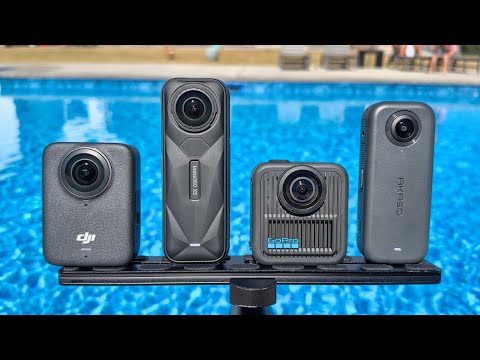
Pros and Cons of 360 Action Cameras
- Total capture: Nothing is missed because every direction is recorded simultaneously.
- Reframing flexibility: You choose the final angle in post-production, not during filming.
- Immersive experiences: Ideal for VR content, virtual tours, and interactive storytelling.
- Compact design: Most models are small enough to mount almost anywhere.
- Built-in stabilization: Software stabilization eliminates shakes without gimbals.
- Stitching artifacts: Fast-moving objects near the lens can cause visible seams.
- Low-light limitations: Small sensors and fisheye lenses struggle in very dark environments.
- File sizes: High-resolution 360 footage generates enormous files that require powerful hardware to edit.
- Learning curve: Mastering reframing and editing workflows takes time and practice.
- Audio challenges: Omnidirectional microphones capture noise from all directions, requiring careful audio management.

Conclusion
The 360 action camera is one of the most exciting tools in the modern content creator’s arsenal. Its ability to capture the entire surrounding world in a single shot opens up creative avenues that traditional cameras and even standard action cams cannot rival. From beginner travel vlogs shot casually on a wrist mount to professional-grade VR documentaries produced with 8K rigs, the technology continues to mature rapidly. By understanding the key features, choosing the right model for your skill level, mastering shooting and editing techniques, and avoiding common pitfalls, you will be well-equipped to produce compelling, immersive content that stands out. The future of visual storytelling is spherical, and the best time to dive in is now.
Frequently Asked Questions (FAQs)
What is the best 360 action camera for beginners in 2024?
The Insta360 GO 3 is widely regarded as the best entry-level 360 camera for vlogging and casual use. It is pocket-sized, water-resistant, offers 5.7K resolution, and connects effortlessly to smartphones through a dedicated app. Its automatic stitching and one-tap editing features make it ideal for creators who want to produce polished content without a steep learning curve.

Can you reframe 360 video into traditional flat video?
Yes, absolutely. One of the greatest advantages of 360 video is the ability to reframe it after capture. Using software like Adobe Premiere Pro, Insta360 Studio, or After Effects, you can select any angle within the spherical footage and export it as a standard flat video with smooth, controlled camera movements. This makes 360 cameras incredibly versatile for creators who publish on both traditional and immersive platforms.
How much storage do you need for 360 action camera footage?
A single minute of 8K 360 video can occupy roughly 400 to 600 megabytes depending on the bitrate and compression settings. For extended shoots, a 256GB microSD card is recommended as a baseline, while professionals often carry 512GB or even 1TB cards to avoid running out of space during demanding sessions. Using external SSDs for backup is also strongly advised.
Are 360 cameras good for low-light environments?
While modern 360 action cameras have improved significantly in low-light performance, they still face challenges compared to full-frame traditional cameras due to their small sensors and fisheye optics. Models like the Insta360 X4 and GoPro MAX 2 perform reasonably well in moderate low-light conditions, but for extremely dark environments, adding external lighting or using cameras with larger sensors will yield better results. A practical tip is to shoot at higher ISO settings and apply noise reduction in post-production.
Do you need a VR headset to view 360 content?
No, you do not need a VR headset. While VR headsets provide the most immersive way to experience 360-degree camera footage, you can also view 360 videos and photos on a smartphone by simply moving the device around, or on a computer by clicking and dragging within the video player. Major platforms like YouTube, Facebook, and Vimeo all support 360 content playback natively, making it accessible to virtually any audience.
What is the difference between a 360 camera and a traditional action camera?
The core difference lies in the field of view. A traditional action camera like the GoPro Hero records within a fixed rectangular frame, typically between 120 and 180 degrees, while a 360 action camera captures a full 360-degree spherical view using two fisheye lenses. This means a 360 camera records everything around it, allowing viewers to explore the entire scene and the creator to reframe the shot later. Traditional action cameras still excel in situations requiring ultra-high frame rates, specialized shutter speeds, and long-range zoom, but for immersive, flexible capture, omnidirectional cameras are unmatched.