


The world of gaming accessories has evolved dramatically over the past decade, transforming casual setups into highly optimized battlestations that can make the difference between a win and a loss. Whether you are a beginner just discovering the thrill of PC gaming or a seasoned esports competitor chasing rank promotions, the right gaming gear can fundamentally reshape your experience. From precision gaming mice and mechanical keyboards to immersive headsets and ergonomic gaming chairs, accessories gaming has become its own sprawling industry — one worth over $5 billion globally. This guide breaks down everything you need to know about selecting, using, and mastering the best gaming accessories for your setup.
What Are Gaming Accessories? A Complete Overview
Gaming accessories, also referred to as gaming peripherals, are hardware devices and gear designed specifically to enhance the interactive experience of playing video games. They go beyond the basic console controller or stock keyboard and mouse that come bundled with a system. Instead, they are purpose-built tools that offer better precision, faster response times, improved comfort, and deeper immersion.
Think of gaming accessories as the supporting cast behind your main hardware — your PC or console. Without the right peripherals, even the most powerful gaming rig can feel sluggish, uncomfortable, or disconnected from the game itself. The best gaming accessories bridge that gap, giving you tactile control, crystal-clear audio, and a setup that feels custom-built for how you play.
The Core Categories of Gaming Gear
- Input devices: gaming keyboards, gaming mice, mouse pads, and controllers
- Audio equipment: gaming headsets, microphones, soundbars, and audio mixers
- Display accessories: gaming monitors, monitor arms, and G-Sync/FreeSync modules
- Comfort and ergonomics: gaming chairs, desk accessories, wrist rests, and standing desk converters
- Aesthetic and RGB gear: LED lighting strips, RGB hubs, and themed peripheral sets
- Streaming and content creation tools: capture cards, streaming cameras, and dedicated streaming controllers
Why Gaming Accessories Matter for Performance
Some players dismiss accessories as luxury items, but the data and player feedback tell a different story. Studies in human-computer interaction have consistently shown that input latency, tactile feedback, and ergonomic design directly affect reaction time, accuracy, and long-term endurance during extended gaming sessions. Here is a closer look at why gaming peripherals actually matter.
Reduced input lag. A high polling rate gaming mouse reports its position to your PC hundreds of times per second. A mechanical gaming keyboard with sub-1ms actuation ensures your commands register almost instantaneously. These microsecond advantages compound during competitive gameplay.
Improved accuracy and precision. Gaming mice with adjustable DPI, advanced sensors like the PixArt PMW3360 or HERO 25K, and specialized shapes allow for pixel-perfect aiming. Paired with a quality mouse pad, the difference is immediately noticeable in shooters, MOBA games, and RTS titles.
Audio situational awareness. A dedicated gaming headset with directional audio lets you hear footstep cues, reload sounds, and environmental callouts that speakers simply cannot replicate. This is arguably one of the most underrated gaming accessories in competitive play.
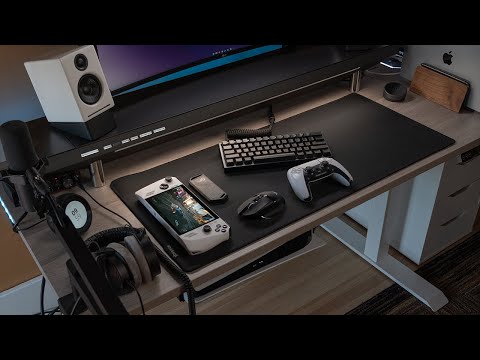
Ergonomic sustainability. Long gaming sessions lead to repetitive strain injuries, wrist fatigue, and posture-related pain. Ergonomic gaming chairs, split keyboards, and wrist supports are not luxuries — they are long-term health investments.
Essential Gaming Accessories for Beginners
If you are new to the world of accessories gaming, it is wise to start with the essentials before diving into enthusiast-level hardware. Here are the must-have gaming accessories for beginners that will immediately elevate any setup without breaking the bank.
- A decent gaming mouse — Look for a wired optical mouse with at least 1200 DPI and programmable buttons. Brands like Logitech, Razer, and SteelSeries offer reliable entry-level options.
- A mechanical keyboard — Membrane keyboards work, but mechanical switches provide superior feedback. Cherry MX Red or Brown switches are great starting points.
- A basic gaming headset — Something with a detachable microphone and decent frequency response. Budget options from HyperX and Turtle Beach deliver surprisingly good audio.
- A large mouse pad — A full desk-sized cloth mouse pad improves tracking consistency and protects your surface.
- A monitor stand or riser — Elevating your display to eye level prevents neck strain and instantly improves comfort.
Beginners should focus on reliability and comfort over brand prestige. You do not need an RGB-lit everything setup on day one. Build gradually based on what games you play and what areas of your setup feel limiting.
Intermediate Gaming Accessories — Leveling Up
Once you have the basics covered and know your preferences, intermediate gaming accessories offer meaningful upgrades in build quality, customization, and performance. This is where most dedicated gamers spend their time and budget.
Upgrading Your Input Devices
At this stage, consider investing in a gaming keyboard with hot-swappable switches, per-key RGB lighting, and a sturdy aluminum frame. Custom mechanical keyboards have become a hobby within a hobby, with enthusiasts hunting for specific switch types like Gateron Yellow, Kailh Box Whites, or Cherry MX Speed Silvers.
Similarly, a mid-range gaming mouse with adjustable weights, interchangeable side buttons, and a sensor capable of 25K+ DPI gives you the fine-tuning needed for competitive play. The accessori gaming market at this tier is dominated by brands like ASUS ROG, Corsair, HyperX, and SteelSeries — all offering products that balance performance with affordability.
Audio Upgrades
An intermediate gamer should look at open-back headphones for single-player immersion or high-isolation closed-back headsets for competitive team environments. Adding an external USB audio interface or a dedicated microphone improves voice communication dramatically for multiplayer sessions and streaming alike.
Advanced Gaming Accessories for Pros and Enthusiasts
The advanced tier of gaming accessories is where cutting-edge technology meets luxury. Professional esports players, content creators, and enthusiasts who demand the absolute best gravitate toward these products.
High-refresh-rate gaming monitors with 240Hz, 360Hz, or even 480Hz refresh rates paired with adaptive sync technology deliver buttery-smooth visuals that give competitive players a measurable edge. TN panels have mostly given way to fast IPS panels that combine wide viewing angles with response times under 1ms.
Custom-modified controllers and elite-tier gamepads with swapable thumbsticks, back paddles, and hair-trigger mechanisms represent the pinnacle of console gaming accessories. Companies like Scuf, Rise, and Xbox’s own Elite controller series lead this space.
Gaming chairs at the advanced level go far beyond racing-style buckets. Ergonomic chairs with lumbar support systems, adjustable headrests, breathable materials, and reclining mechanisms from brands like Secretlab, Herman Miller, and Respawn 100 redefine what comfort means during marathon sessions.
Specialized accessories gaming equipment at this tier also includes things like dedicated streaming desks with integrated cable management, dual-monitor arm setups, ambient lighting systems like Philips Hue for immersive room-scale effects, and even foot pedals for racing game simulations.
Choosing the Right Peripherals: A Comparison Guide

One of the most common questions in the gaming accessories space is: budget vs. premium — what is really worth it? The table below breaks down key categories to help you decide.
| Category | Budget Range | Premium Range | Is the Upgrade Worth It? |
| Gaming Mouse | $20-$40 | $80-$160 | Yes — better sensors, lighter weight, and customization |
| Mechanical Keyboard | $50-$80 | $150-$350 | Yes for custom switches and build quality |
| Gaming Headset | $30-$60 | $100-$250 | Yes — superior soundstage and microphone clarity |
| Gaming Monitor | $200-$300 | $500-$1000+ | Critical for competitive play at high refresh rates |
| Gaming Chair | $80-$150 | $300-$600 | Yes — long-term ergonomic benefits are significant |
| Mouse Pad | $10-$20 | $30-$60 | Moderate — noticeable improvement in glide and consistency |
Expert Tips for Selecting Gaming Accessories
Navigating the gaming gear marketplace can be overwhelming with hundreds of products and overlapping feature sets. These expert tips will help you make smarter purchasing decisions every time.
- Always prioritize your primary use case. Are you playing competitive shooters, story-driven RPGs, or racing simulators? Your game genre should directly influence which peripherals matter most.
- Read professional reviews, not just user ratings. Reviewers from outlets like RTS, TechRadar, and Linus Tech Tips provide tested, objective comparisons that customer reviews often cannot.
- Consider your desk space before buying. A massive mouse pad and wide keyboard are useless on a cramped desk. Measure your space and plan your layout first.
- Test ergonomics in-store if possible. Gaming chairs, in particular, vary wildly in comfort. A chair that looks great online may cause back pain after two hours.
- Do not overlook cable management. Clean setups reduce distractions and improve airflow. Velcro ties, cable trays, and under-desk mounts are inexpensive gaming accessories that make a big visual and functional difference.
- RGB is fun but never a performance feature. Do not let flashy lighting distract you from the specifications that actually matter — polling rate, actuation force, frequency response, and build materials.
- Buy from authorized retailers. Counterfeit gaming accessories are rampant online. Stick to official brand stores, Amazon verified sellers, or authorized electronics retailers to protect your investment.
Conclusion
The world of accessori gaming is vast, exciting, and endlessly customizable. Whether you are outfitting your first gaming PC or upgrading a battle-tested setup for tournament play, the right gaming accessories transform how you play, feel, and connect with the games you love. Start with the essentials, learn what works for your play style, and upgrade intentionally. Avoid impulse buys, do your research, and always let your gaming genre and comfort needs guide your choices. With the information in this guide, you now have a strong foundation for building a setup that is not just visually impressive but genuinely optimized for performance and enjoyment. The best gaming accessories are the ones that disappear into the experience — letting you focus entirely on the game.
Frequently Asked Questions About Gaming Accessories
What are the most important gaming accessories for a new PC gamer?
The absolute essentials are a reliable gaming mouse, a mechanical keyboard, a quality headset, and a large mouse pad. These four items provide the biggest immediate improvement to comfort and performance. A monitor arm or desk lamp can also make a meaningful difference in your daily gaming experience.
How do I choose between a wireless and wired gaming mouse?
Wired mice still hold a slight edge in input latency, which matters in competitive play. However, modern wireless gaming mice using Bluetooth Low Energy or proprietary 2.4GHz receivers have closed the gap to nearly imperceptible levels. If you value cable-free freedom and have a strong battery preference, top-tier wireless options are now fully competitive with their wired counterparts.
Are expensive gaming chairs worth the investment?
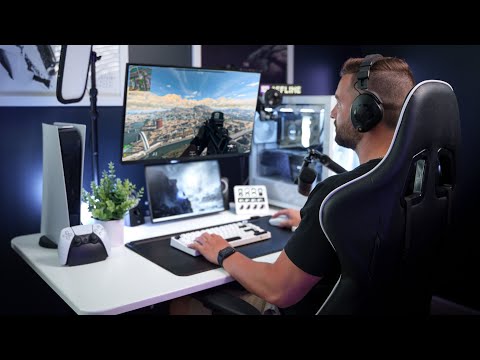
For anyone who games for more than two hours daily, a quality ergonomic chair is absolutely worth the investment. Poor posture leads to chronic back and neck issues that compound over years. Premium chairs like those from Secretlab or Herman Miller offer adjustable lumbar support, high-density foam, and durable materials that last well beyond the typical gaming cycle.
What gaming accessories do professional esports players use?
Most pro players favor lightweight wireless mice with high sensors, rapid mechanical keyboards with linear switches, headsets with excellent directional audio, and high-refresh-rate gaming monitors. Brands like Logitech G, Razer, SteelSeries, and ASUS ROG are heavily represented in professional circuits. Many pros also customize their gear extensively with custom keycaps, mouse skates, and specialized cables.
How much should I spend on gaming accessories as a beginner?
A reasonable beginner budget for core gaming accessories falls between $150 and $300. This covers a decent gaming mouse, a solid mechanical keyboard, a competent headset, and a good mouse pad. You can always upgrade individual components over time rather than investing everything at once, which is a smart long-term strategy.
Do RGB gaming accessories actually improve the gaming experience?
RGB lighting does not improve performance, but it does enhance immersion and personalization. Ambient lighting can reduce eye strain in dim environments by providing soft background illumination. Many RGB ecosystems also sync with in-game events, creating a more atmospheric experience. However, functionality should always take priority over aesthetics when selecting your gaming gear.