



When something breaks—whether it is a piece of software, a piece of machinery, or an entire IT system—most people panic. But experienced professionals know that structured problem solving is the real game changer. The seven step troubleshooting framework has been used by engineers, IT support teams, and system administrators for decades because it replaces guesswork with a repeatable, methodical process. In this guide, we walk through every stage of the troubleshooting methodology in full detail, compare it against other approaches, and share practical tips that will help you resolve issues faster and with greater confidence.
What Is the 7 Step Troubleshooting Process?
Seven step troubleshooting is a systematic diagnostic approach that divides problem solving into seven distinct phases. Each step builds on the previous one, guiding the technician or user from initial problem identification all the way through resolution and prevention. Unlike ad hoc troubleshooting, where you randomly swap components or restart devices hoping something fixes itself, the seven step method ensures that you understand the root cause before taking action. This structured framework applies across industries—networking, manufacturing, software development, automotive repair, and household appliance maintenance all benefit from it.
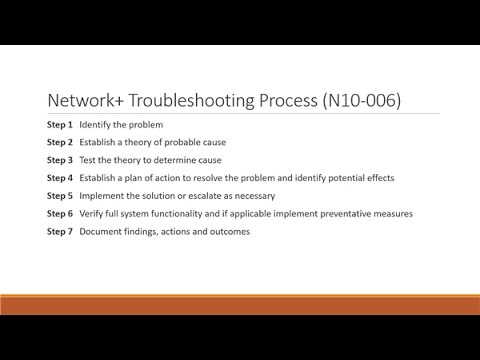
The core idea is simple: define the problem, gather information, identify possible causes, test hypotheses, establish a plan of action, implement the fix, and verify full functionality. What makes this framework powerful is its discipline. It forces you to slow down and think before you act, which dramatically reduces the risk of making the problem worse or wasting time on unnecessary fixes.
Why 7 Step Troubleshooting Is More Effective Than Other Methods
Many people ask why they should follow a seven step process instead of just troubleshooting intuitively. The answer lies in consistency and scalability. When you face a complex system failure, intuition alone often leads you down rabbit holes. A structured approach, on the other hand, narrows your focus and gives you a clear path forward.
Below is a comparison table that highlights how the seven step method stacks up against two other common approaches.
| Method | Structure | Best For | Risk of Missing Root Cause | Reproducibility |
| 7 Step Troubleshooting | Highly structured and sequential | Complex, multi-layered failures | Low—each step validates assumptions | High—documented and repeatable |
| Intuitive Troubleshooting | Unstructured, experience-based | Simple, familiar problems | High—relies heavily on gut feeling | Low—varies by person |
| Divide and Conquer | Bisection-based, logical splitting | Large systems with binary checkpoints | Medium—can skip peripheral causes | Medium—depends on test points |
As you can see, the seven step framework offers the best balance of rigor and practicality. It is not the fastest method in every scenario, but it is the most reliable, especially when you are dealing with unfamiliar problems or high-stakes systems where downtime is costly.
The 7 Steps of Troubleshooting Explained in Detail
Now let us dive into each of the seven steps with enough depth that you can apply them immediately in your own workflow.
Step 1: Identify the Problem
The very first step in any structured troubleshooting process is identifying the problem clearly and precisely. This means gathering initial symptoms from the user or the system itself. Ask targeted questions: When did the issue start? What were you doing when it occurred? What changed recently in the environment? Write down every symptom you observe, no matter how minor it seems. A problem that appears to be a network outage might actually be a misconfigured DNS entry or a failing cable. Documenting symptoms prevents you from jumping to conclusions too early.
- Note the exact error messages or codes displayed
- Record the time, frequency, and conditions under which the problem occurs
- Identify which users, devices, or processes are affected
- Determine whether the issue is new or recurring
Expert tip: Never assume you understand the problem from the first description alone. The person reporting the issue may not have the technical vocabulary to explain it accurately, so probe gently and ask follow-up questions.
Step 2: Establish a Theory of Probable Cause
Once you have a clear picture of the symptoms, move to step two: forming a theory about what might be causing the problem. This is where your domain knowledge becomes critical. You brainstorm all plausible causes based on the symptoms, system architecture, and recent changes. Common categories to consider include hardware failures, software bugs, configuration drift, environmental factors like power or temperature, and user error.
- List every possible cause that fits the observed symptoms
- Rank the causes by probability based on your experience
- Consider recent changes—updates, migrations, new equipment, or personnel changes
- Cross-reference with known issues in documentation or knowledge bases
Expert tip: Use the “5 Whys” technique during this stage. Ask yourself why the symptom is happening, then why that cause exists, and keep going until you reach a fundamental root. This prevents you from treating symptoms instead of causes.
Step 3: Test Your Theory to Determine the Actual Cause
This is where you move from hypothesis to evidence. In step three, you systematically test each probable cause, starting with the most likely one. Testing must be safe—never make changes to a production system without a rollback plan. Use diagnostic tools, run logs, check configurations, and isolate variables. If your first theory does not hold up, move to the next one on your list. The goal is to conclusively identify the actual cause of the problem, not just a contributing factor.
Expert tip: Keep a log of every test you perform and its result. This not only helps you track your progress but also creates a valuable troubleshooting record for future reference.
Step 4: Establish a Plan of Action to Resolve the Problem
After identifying the root cause, you need a plan. Step four is all about planning your resolution before executing it. Define the specific actions you will take, the order in which you will take them, and any potential side effects. Consider escalation paths—if your plan fails, what is your backup? A well-thought-out plan minimizes disruption and gives you confidence when you begin implementation.
- Document the exact steps you will take to fix the issue
- Identify any resources or permissions you will need
- Determine the order of operations—fix the most critical element first
- Prepare a rollback or contingency plan for each step
Expert tip: If the fix involves multiple systems, coordinate with stakeholders first. An unplanned change in one system can cascade into another, creating secondary problems that are harder to diagnose.
Step 5: Implement the Solution
With your plan in hand, step five is execution. This is where you apply the fix. Follow your plan exactly, making one change at a time whenever possible. Making multiple changes simultaneously makes it nearly impossible to determine which change actually resolved the problem—and which one might have introduced a new issue.
- Execute the first action in your plan of action
- Observe the system’s response after each change
- If something unexpected happens, stop and reassess before continuing
- Proceed through the remaining steps only after confirming each one
Expert tip: When working on critical systems, always have a snapshot, backup, or restore point available before you begin implementing any fix. This gives you a safety net if something goes wrong.
Step 6: Verify Full System Functionality

Many less experienced troubleshooters skip this step, but it is one of the most important. After implementing the fix, you must verify that the problem is truly resolved and that nothing else has been broken in the process. Test all affected functions, check related subsystems, and confirm that the system is performing as expected under normal operating conditions.
- Reproduce the original issue scenario to confirm it no longer occurs
- Check logs for any new errors or warnings
- Validate that all dependent services or components are functioning
- Get confirmation from the end user or stakeholder that the problem is resolved
Expert tip: Do not declare the issue fixed until you have tested it under conditions that mirror normal usage. A fix that works under a simple test but fails under load is not a real fix.
Step 7: Document Findings, Actions, and Outcomes
The final step is documentation. Write a clear summary of what the problem was, what caused it, how you diagnosed it, what fix you applied, and what you learned. This documentation serves multiple purposes: it helps future troubleshooting efforts, it builds institutional knowledge, and it contributes to long-term improvement of your processes and systems.
Expert tip: Update your knowledge base, runbook, or wiki with relevant entries from each incident. Over time, this documentation turns into a powerful troubleshooting resource that accelerates resolution times for your entire team.
Common Mistakes People Make During Troubleshooting
Even with a solid framework in place, certain mistakes can derail your efforts. Here are the most common pitfalls and how to avoid them:
- Skipping step one: Jumping straight to solutions without properly identifying the problem leads to wasted effort and misdiagnosis.
- Ignoring recent changes: Most system failures correlate with a recent change—software update, configuration change, or hardware swap. Always investigate changes first.
- Changing multiple variables at once: This destroys your ability to isolate the actual cause and can introduce new problems.
- Not verifying the fix: A temporary workaround is not a solution. Always confirm the problem is fully resolved.
- Poor documentation: If you do not write it down, your team will repeat the same mistakes in the future.
When to Escalate or Bring in Expert Support
Structured troubleshooting does not mean you must solve every problem alone. Knowing when to escalate is itself a skill. If you have worked through the seven steps and cannot identify the root cause, or if the problem involves hardware or systems you are not qualified to handle, it is time to escalate. Document everything you have already tried so that the next person picking up the case does not waste time repeating your efforts. Escalation is not a failure—it is a smart, strategic decision that respects both your time and the complexity of the issue.
Frequently Asked Questions
What are the 7 steps of troubleshooting in IT?
The seven steps in IT troubleshooting are: identify the problem, establish a theory of probable cause, test the theory to determine the actual cause, establish a plan of action to resolve the problem, implement the solution, verify full system functionality, and document findings and outcomes. This framework is widely used in IT support, network administration, and system engineering to ensure consistent and reliable results.
How do you troubleshoot a problem step by step?
Begin by clearly defining the problem through observation and questioning. Then brainstorm possible causes based on your knowledge and the system’s history. Test each probable cause systematically using diagnostic tools and logs. Once you identify the root cause, plan your fix carefully, implement it one change at a time, verify that the system works correctly afterward, and document everything for future reference. Following these structured steps prevents random, ineffective troubleshooting.

Why is the 7 step troubleshooting method important for beginners?
For beginners, the seven step method provides a safety net that prevents common mistakes like skipping diagnosis or changing too many things at once. It teaches disciplined thinking, helps build technical knowledge over time, and ensures that even those with limited experience can approach complex problems methodically rather than relying on guesswork or trial and error.
Can the 7 step troubleshooting process be adapted for software debugging?
Absolutely. Software developers and DevOps engineers frequently adapt the seven step framework for debugging code, diagnosing application errors, and resolving deployment issues. The principles remain the same—identify the bug, theorize the cause, test the hypothesis, plan the fix, implement it, verify the correction, and document the process—just applied to the specific context of software development and debugging workflows.
What tools help with each step of the troubleshooting process?
Different tools support different steps. For step one, ticketing systems and user interview notes help capture symptoms. For step two and three, diagnostic utilities like ping, traceroute, log analyzers, and monitoring dashboards are invaluable. For step five and six, configuration management tools, version control systems, and testing environments help implement and verify fixes safely. For step seven, knowledge base platforms, wikis, and incident management software keep documentation organized and accessible.
Conclusion
The seven step troubleshooting framework is more than just a checklist—it is a philosophy of disciplined problem solving that transforms chaos into clarity. Whether you are a beginner just learning the ropes or an experienced professional handling mission-critical systems, following these seven steps consistently will help you resolve issues faster, reduce repeat failures, and build a body of knowledge that benefits your entire team. The key is to resist the temptation to skip steps, to document everything you learn, and to treat every incident as an opportunity to improve your diagnostic skills. Master this process, and you will find that even the most complex problems become manageable.